IntelliJ IDEA Plugin

Test APIs Directly
from OpenAPI YAML

No more switching to Postman or maintaining .http files. Green run buttons appear next to every API operation in your YAML editor — click, review, send.

1-ClickSend Request
3Request Tabs
i18nEN / 中文
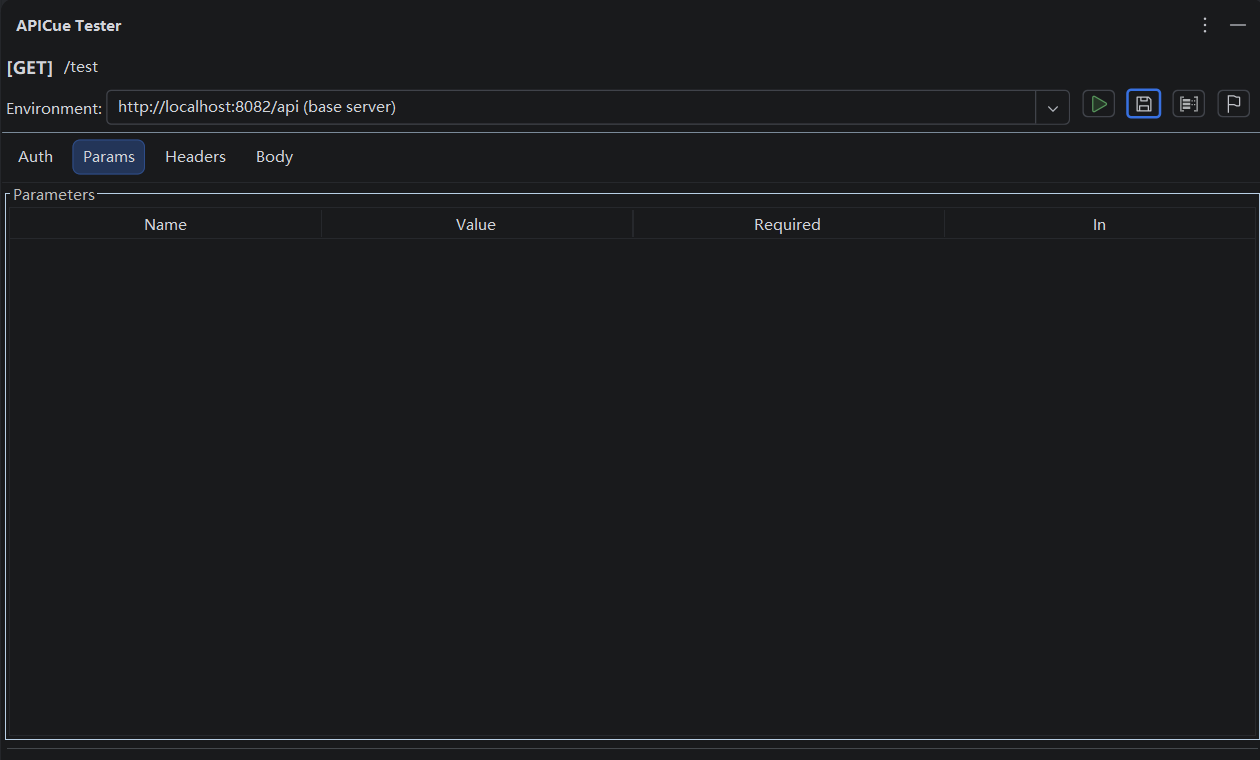
APICue main tester panel

Everything You Need for API Testing

APICue brings Postman-class API testing into your IntelliJ IDEA — tightly coupled with your OpenAPI specifications.

Gutter Icon Triggers

Green ▶ buttons appear next to every get:, post:, put:, delete:, and patch: operation. Click to open the test panel instantly.

Dedicated ToolWindow

Right-side panel shows the full testing interface: environment selector, auth config, request editor (Params / Headers / Body), and split-pane response viewer.

Auth Auto-Discovery

Reads securitySchemes and security from your spec, auto-generates Bearer JWT, Basic Auth, and API Key headers. No manual setup.

Multi-Environment Servers

Switch between multiple servers per YAML file. Last-selected URL is remembered per-file across IDE restarts.

Smart Parameter Pre-Fill

Query params, headers, and body auto-filled from example, default, and schema property values following a well-defined priority hierarchy.

Save & Load Examples

Save working request/response payloads back to the YAML as OpenAPI examples. Load them later for reproducible testing and regression checks.

Token Manager

Manage JWT, API Keys per environment with a built-in Token Manager. Tokens stored securely using your IDE's password-safe mechanism.

$Ref Cross-File Resolution

Fully resolves $ref across YAML files (e.g. $ref: 'model.yml#/…') with caching and circular-reference detection.

i18n (EN / 中文)

Supports both English and Chinese UI. Automatically matches your IDE's language setting. Perfect for global teams.

See It in Action

A clean, intuitive interface designed for developer workflow.

APICue main tester panel
APICue Tester panel — server selector, auth tab, request editor with Params / Headers / Body tabs, and Send button.
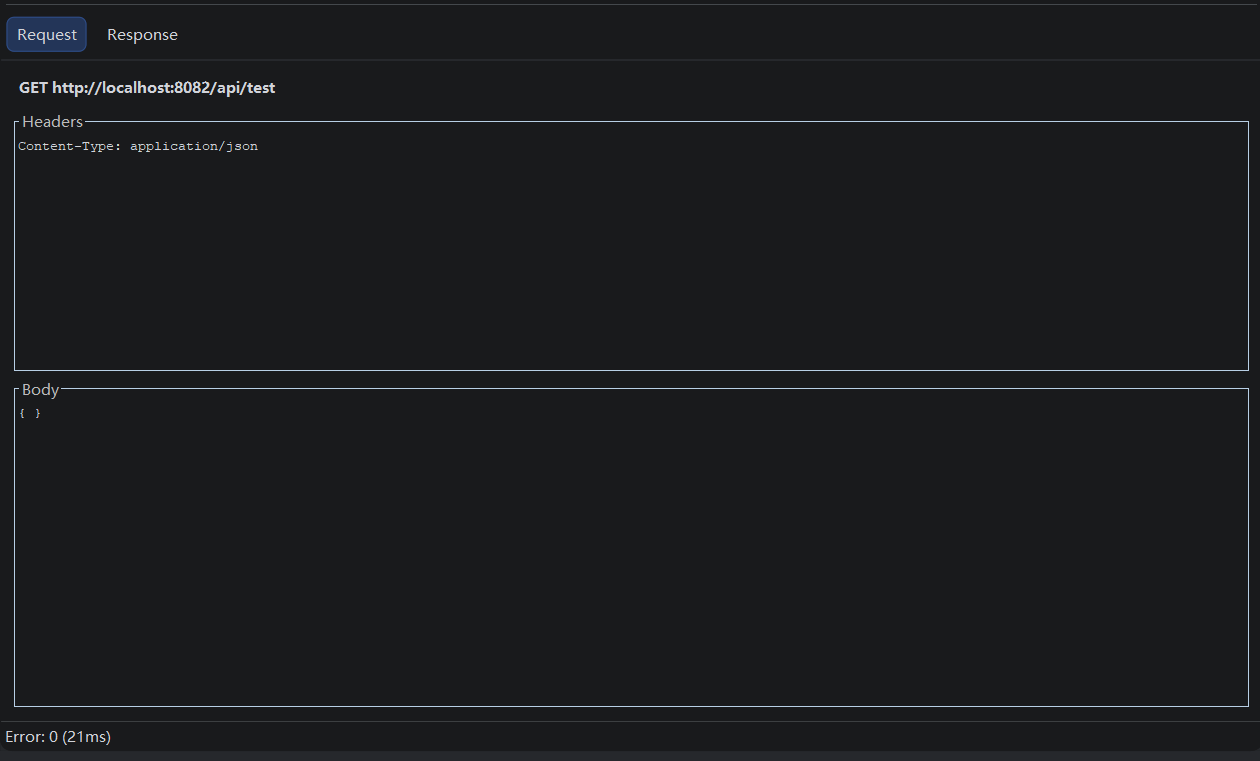
APICue response viewer
Response viewer — status code, timing info, response headers, and syntax-highlighted JSON body.

From Spec to Response in 4 Steps

No configuration files, no external tools — just your OpenAPI YAML and APICue.

📂

Open an OpenAPI YAML File

Any .yaml or .yml file with valid OpenAPI 3.0 syntax. APICue parses it on the fly.

Click the Gutter Icon

Green ▶ buttons appear next to every API operation. Click one — the APICue Tester tool window opens instantly.

⚙️

Review & Configure

Select your target server, review auto-filled params/headers/body, configure auth tokens. Everything is pre-filled from your spec.

🚀

Send & Inspect

Click Send Request. Inspect the response with syntax highlighting, timing, and status code — all inside the IDE.

Works Where You Work

Built for IntelliJ IDEA with zero external runtime dependencies.

  • Platform IntelliJ IDEA Ultimate / Community
  • Since Build 241 (2024.1)
  • Until Build 251.* (2025.1)
  • JDK 17+
  • Language Kotlin + Java
  • Plugin ID com.tpv.scs.openapi.tester
  • License Commercial (paid)

📦 Built-in Dependencies

OkHttp4.12.0
SnakeYAML2.2
Kotlinx Coroutines1.7.3
Gson2.11.0

All dependencies are bundled — no separate installation needed.

Simple, Transparent Pricing

Try it free for 30 days. No credit card required.

Monthly

$1 /mo
per developer
  • Full feature access
  • Priority updates
  • Email support
  • Cancel anytime
View License

Frequently Asked Questions

Everything you need to know about APICue.

The built-in HTTP Client requires you to maintain separate .http files that duplicate your API spec. APICue reads your OpenAPI YAML directly — no duplication, no drift. It auto-discovers auth schemes, pre-fills parameters from examples, and lets you save responses back to the spec.
APICue runs on IntelliJ IDEA Ultimate and Community Edition (build 241–251.*). Support for other JetBrains IDEs with YAML plugin support may be added in future releases.
No, APICue supports OpenAPI 3.0.x only. You can convert your Swagger 2.0 spec using the official Swagger Converter (https://swagger.io/tools/swagger-converter/).
By default, examples are saved in the plugin's global config directory. You can change this in Settings → Tools → APICue to store them inside your project directory — ideal for sharing via version control.
Yes! APICue offers a 30-day free trial with full feature access. No credit card required. After the trial, a paid license is required for continued use.
Yes — any protocol supported by OkHttp works for HTTPS. For development with self-signed certificates, we recommend testing over HTTP first, or configuring your IDE's trust store.
Absolutely! APICue is open-source on GitHub. Visit github.com/davin-bao/apicue-public to open issues, submit pull requests, or start discussions.

Ready to Streamline Your API Workflow?

Stop switching between your IDE and Postman. Test, iterate, and document — all from your OpenAPI YAML files.

Install APICue Free